

Gateway API Helm Chart — install Kubernetes Gateway API (CRDs, GatewayClass, Gateway, HTTPRoute, GRPCRoute, TCPRoute, UDPRoute) via Helm. Kubernetes-native successor to Ingress.
| Resource | URL |
|---|---|
| Helm chart repo | charts.cdnn.host |
| Git source | github.com/dev2prod-hub/gateway-api-chart |
| Artifact Hub | artifacthub.io/packages/search?repo=gateway-api-chart |
Replace ingress with the Gateway API Helm chart. Gateway API is the Kubernetes-native successor to Ingress for managing API gateways and routing.
Stop reinventing Ingress controllers. Start using the Kubernetes-native successor.
The Gateway API follows a role-oriented design with three layers:
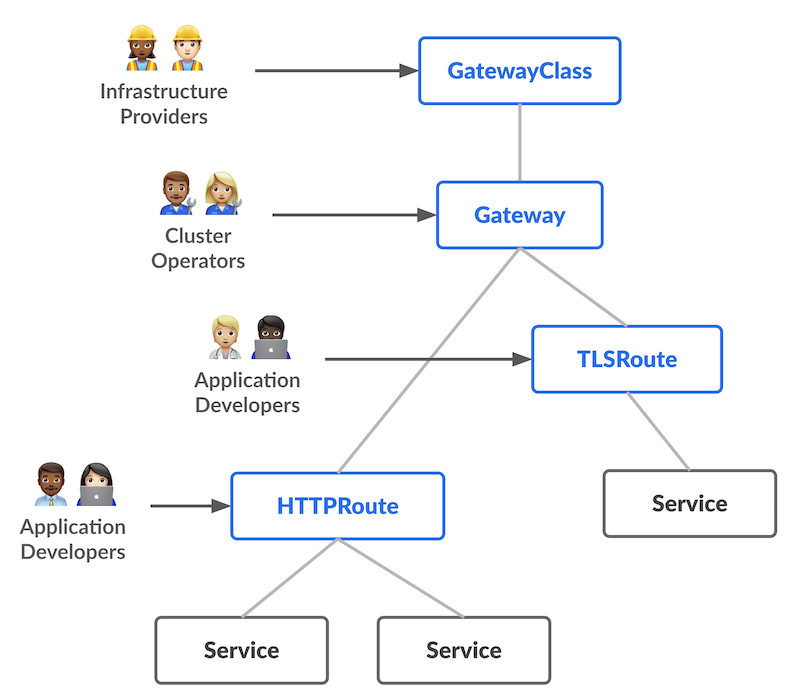
Source: Kubernetes Gateway API Documentation
This repository provides two separate Helm charts that align with the Gateway API resource model:
gateway-api - Infrastructure LayerPurpose: Manages the infrastructure layer of Gateway API.
What it installs:
When to use: Install this chart once per cluster or namespace to set up the gateway infrastructure. Typically managed by cluster operators or infrastructure teams.
gateway-api-routes - Routing LayerPurpose: Manages the routing layer of Gateway API.
What it installs:
When to use: Install this chart per application or
team to define routing rules. Routes reference Gateways via
parentRefs. Typically managed by application
developers.
This separation provides:
gateway-api as a
dependency in infrastructure charts, and gateway-api-routes
in application chartsProvides opinionated yet flexible configurations for:
Designed to be used either:
Install the Gateway API Helm chart from charts.cdnn.host:
helm repo add dev2prod https://charts.cdnn.host/
helm repo update
helm repo search dev2prodhelm install my-gateway dev2prod/gateway-api \
--version 1.0.0 \
--skip-crdsInstall gateway-api with CRDs
helm install my-gateway dev2prod/gateway-api \
--version 1.0.0helm install routes dev2prod/gateway-api-routes \
--version 1.0.0✔️ CRD Management — Original CRDs from kubernetes-sigs (unchanged) ✔️ CRD Version v1.4.1 (experimental) — TCPRoute, TLSRoute, UDPRoute, experimental features ✔️ Two Helm charts — gateway-api (infra) and gateway-api-routes (HTTPRoute, GRPCRoute, TCPRoute, UDPRoute)
# values.yaml
gatewayClass:
  name: envoy-gateway
  controller: "application-networking.k8s.aws/gateway-controller"

gateway:
  name: envoy-gateway
  listeners:
  - protocol: HTTPS
    port: 443
    tls:
      mode: Terminate
      certificateRefs:
      - name: mydomain-com-tls
kind: SecrethttpRoute:
enabled: true
items:
- name: http-filter-redirect
parentRefs:
- name: redirect-gateway
sectionName: http
hostnames:
- redirect.example
rules:
- filters:
- type: RequestRedirect
requestRedirect:
scheme: https
statusCode: 301
- name: https-route
parentRefs:
- name: redirect-gateway
sectionName: https
hostnames:
- redirect.example
rules:
- backendRefs:
- name: example-svc
port: 80📚 Official References:
🔗 Related Projects:
This is a personal project maintained by:
Kirill Kazakov - Full Stack DevOps and Magician
Maintained with ❤️ by Kirill Kazakov. Licensed under Apache 2.0.